<?xml version="1.0" encoding="utf-8"?><feed xmlns="http://www.w3.org/2005/Atom" ><generator uri="https://jekyllrb.com/" version="4.4.1">Jekyll</generator><link href="https://byrnecodes.com/feed.xml" rel="self" type="application/atom+xml" /><link href="https://byrnecodes.com/" rel="alternate" type="text/html" /><updated>2026-11-26T15:49:37+00:00</updated><id>https://byrnecodes.com/feed.xml</id><title type="html">Byrnecodes</title><subtitle>James Byrne is a freelance full-stack developer in Ireland: Ember and Rails web apps, iPhone and Apple Watch apps, and payment systems.</subtitle><author><name>James Byrne</name></author><entry><title type="html">Swiss cheese for AI agents</title><link href="https://byrnecodes.com/2026/11/16/test-first-delivery-with-ai-agents" rel="alternate" type="text/html" title="Swiss cheese for AI agents" /><published>2026-11-16T00:00:00+00:00</published><updated>2026-11-16T00:00:00+00:00</updated><id>https://byrnecodes.com/2026/11/16/test-first-delivery-with-ai-agents</id><content type="html" xml:base="https://byrnecodes.com/2026/11/16/test-first-delivery-with-ai-agents"><![CDATA[<h2 id="the-problem-with-fast">The problem with fast</h2>

<p>AI coding agents are fast. Give one a vague request and it will happily write a few hundred lines, tell you it’s done, and be wrong in ways you won’t notice until a user does. Speed isn’t the hard part any more. Knowing the change is right is.</p>

<p>So for Bogha, my archery training app for iPhone and Apple Watch, I stopped asking “how do I get the agent to write more?” and started asking “what would make me trust what it writes?”</p>

<h2 id="swiss-cheese">Swiss cheese</h2>

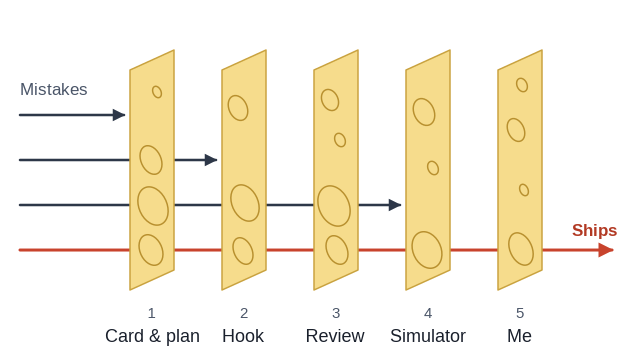
<p>My answer is borrowed from aviation safety. The Swiss cheese model treats every defence as a slice of cheese. Each slice has holes, and things only go wrong when the holes in every slice line up. You don’t need a perfect slice. You need enough slices with their holes in different places.</p>

<p>Every step in how I build Bogha is a slice. At each one, either I or the agent gets a chance to catch a mistake, fix the context the agent is working from, or correct an assumption before it turns into code. No single step is trusted on its own: not the tests, not the review, not even me.</p>

<div class="flex justify-center my-6">
  <img src="/assets/img/blog-posts/test-first-delivery-with-ai-agents/swiss-cheese.svg" width="640" height="360" alt="Swiss cheese diagram: five slices labelled card and plan, hook, review, simulator and me, each with holes in different places. Three mistakes are stopped at the first, second and fourth slices. A fourth gets through only because a hole in every slice lines up." />
</div>

<p>Stack enough of them and the pipeline can build complex features, as long as what goes in at the top is right. Here are the slices, in order.</p>

<h2 id="slice-1-the-card-and-the-plan">Slice 1: the card and the plan</h2>

<p>Every piece of work is a card: a small markdown file with a type, a status and a link to its spec. An agent picks up the top ready card, writes a plan, and stops. Nothing gets built until I’ve read the plan and said yes.</p>

<p>The exception is small, well-defined cards that almost certainly don’t need me at the plan stage. Those can run unattended in a batch, which is a post of its own.</p>

<p>The card is the unit of everything: one card per branch, and commits carry a <code class="language-plaintext highlighter-rouge">Card:</code> trailer so I can find a card’s whole history later. When a defect turns up halfway through, it doesn’t get fixed quietly in the same branch. It gets its own card.</p>

<h2 id="slice-2-a-hook-that-says-no">Slice 2: a hook that says no</h2>

<p>The rule that changed the most is the simplest: <strong>no production code without a failing test first.</strong></p>

<p>Agents are very good at agreeing with a rule and then not following it, so I don’t ask. A hook refuses any edit to production Swift until a test file has changed since the last commit. A commit that touches production code without a test needs an explicit <code class="language-plaintext highlighter-rouge">No-Test:</code> reason in its message, and that reason gets logged on the card.</p>

<p>Every bug fix comes with a regression test, and the test has to be proven: put the bug back, watch the test fail, take it out again.</p>

<h2 id="slice-3-review">Slice 3: review</h2>

<p>Once the build is done, a review pass checks the branch against the project’s own rules: the domain docs, the spec, and the shapes the codebase already uses. It fixes what it safely can, test-first, and stops to ask about the rest.</p>

<h2 id="slice-4-the-simulator">Slice 4: the simulator</h2>

<p>Then the agent runs the app on a simulator, works through the checks listed for the change, and gives me a verdict: low risk and fine to merge, or needs a real device.</p>

<h2 id="slice-5-me">Slice 5: me</h2>

<p>Either way the call is mine. When the verdict says a real device is needed, I get a short checklist of only what the simulator couldn’t prove, and I work through it on my phone, and on my watch when the change touches it. Only my answer merges a card.</p>

<h2 id="what-a-hole-looks-like">What a hole looks like</h2>

<p>Passing tests aren’t proof the app works. Bogha syncs through SwiftData and CloudKit, and in September a change renamed a stored property. It compiled, passed both test suites, and then failed to open every existing store. The tests never saw it because they start from an empty in-memory store. The iPhone app quietly fell back to one too and looked healthy; only the watch crashed.</p>

<p>The tests had a hole. The plan didn’t: it said to open the app over data saved by the old version, and that caught it before it merged. That’s now a rule for every schema change, and QA treats any change to the model or sync code as high risk, so it needs a real device before it merges.</p>

<h2 id="what-the-numbers-say-and-what-they-dont">What the numbers say, and what they don’t</h2>

<p>In the eight weeks since I started working this way, Bogha has shipped 166 cards: 34 features, 40 defects, and the rest chores and QA. Most features shipped within a day of being started. Device QA sent three cards back, and none of the three was a bug: each time, I’d changed my mind about what I wanted once I had it in my hand.</p>

<p>That reads like a success story. It isn’t one yet. Bogha is an unreleased prototype that I build in my spare time, so QA has been lenient, and nothing in the pipeline checks design or UX well enough. The code works, but the features don’t always fit together and parts of it need a refactor. The slices are good at making sure what gets built works. They can’t tell me whether it was the right thing to build. That’s a post of its own.</p>

<h2 id="what-id-tell-you-to-steal">What I’d tell you to steal</h2>

<ul>
  <li>Don’t trust any single check, including yourself. Stack them.</li>
  <li>Make the unit of work small and written down before any code exists.</li>
  <li>Enforce rules with tooling, not with a prompt.</li>
  <li>Treat “the tests pass” as necessary, not sufficient: run the real thing.</li>
  <li>Keep the merge decision human.</li>
</ul>

<p>None of these slices are specific to Bogha, but the way they fit together is. Bogha isn’t deployed when a branch merges, so a card can wait for me. A web service that deploys on every push has no such gap, and its checks have to finish before the merge. A product with real users needs a design slice I don’t have yet. The pipeline has to fit the project and how it ships.</p>

<p>If your team is bringing agents into how it builds software, or already has and isn’t sure it can trust what ships, <a href="#contact-heading">get in touch</a>. I can set up a pipeline that fits your stack, or review the one you have.</p>]]></content><author><name>James Byrne</name></author><summary type="html"><![CDATA[How I build Bogha with AI coding agents: five layers of checks with holes in different places, so a mistake only ships if every hole lines up.]]></summary><media:thumbnail xmlns:media="http://search.yahoo.com/mrss/" url="https://byrnecodes.com/assets/img/social/test-first-delivery-with-ai-agents.png" /><media:content medium="image" url="https://byrnecodes.com/assets/img/social/test-first-delivery-with-ai-agents.png" xmlns:media="http://search.yahoo.com/mrss/" /></entry><entry><title type="html">Ember and tailwindcss</title><link href="https://byrnecodes.com/2020/01/03/ember-and-tailwind" rel="alternate" type="text/html" title="Ember and tailwindcss" /><published>2020-01-03T00:00:00+00:00</published><updated>2020-01-03T00:00:00+00:00</updated><id>https://byrnecodes.com/2020/01/03/ember-and-tailwind</id><content type="html" xml:base="https://byrnecodes.com/2020/01/03/ember-and-tailwind"><![CDATA[<blockquote>
  <p>Update, November 2026: this post was written for Tailwind CSS v1 and an Ember 3 app. Tailwind’s setup has changed a lot since, so check the <a href="https://tailwindcss.com/docs/installation">current Tailwind docs</a> before following the steps below.</p>
</blockquote>

<h2 id="using-tailwindcss">Using tailwindcss</h2>

<p>For the last year or more, both in work and at home, I’ve been using <a href="https://tailwindcss.com">tailwindcss</a> for styling. I love composing styles together with css utility classes to create great User Interfaces (UI) &amp; User Experiences (UX). Overall I’ve found it great and its functional/compositional nature really gels with me.</p>

<blockquote class="pull">
  <p>I also love its component system as well! Reducing the number of abstractions to be made up front is a godsend for any project growing quickly.</p>
</blockquote>

<p>Since I like it so much and I use it in pretty much all my examples for all of my posts I thought I’d write up a quick guide for how to get running with tailwindcss and ember.</p>

<h2 id="cool--but-what-is-it-though">Cool! …. but what is it though?</h2>

<blockquote>
  <p>feel free to skip if you know what tailwind is</p>
</blockquote>

<p>Ok for those of you that haven’t worked with it yet, tailwindcss is a <a href="https://tailwindcss.com/docs/utility-first/">utility-first</a> framework. You start with a set of css classes, each of which do one thing well. You then compose these classes together to get more complex behaviour. For example, below is a simple, overly excited, button.</p>

<div class="language-html highlighter-rouge"><div class="highlight"><pre class="highlight"><code><span class="nt">&lt;button</span> <span class="na">class=</span><span class="s">"bg-pink-500 text-white"</span><span class="nt">&gt;</span>Press ME!<span class="nt">&lt;/button&gt;</span>
</code></pre></div></div>

<div class="flex justify-center my-6">
  <img src="/assets/img/blog-posts/ember-and-tailwind/simple-button-step-1.png" width="1440" height="790" alt="A pink button reading Press ME!" />
</div>

<p>Now the classes here are pretty self explanatory but let’s go through them anyway.</p>

<ul>
  <li><code class="language-plaintext highlighter-rouge">bg-pink-500</code>: set the background colour to pink with a hue of 500
    <ul>
      <li>Hue is a bit like <code class="language-plaintext highlighter-rouge">font-weight</code>, in increments of 100 it gets darker starting at <code class="language-plaintext highlighter-rouge">100</code> and ending at <code class="language-plaintext highlighter-rouge">900</code></li>
    </ul>
  </li>
  <li><code class="language-plaintext highlighter-rouge">text-white</code>: sets the text colour to white</li>
</ul>

<p>Simple enough right? But it’s not really a nice looking button yet. For one the button is only as big as the text we put into it. Let’s make it a tad nicer, we’ll add a shadow, round the corners, add margin and add some padding.</p>

<div class="language-html highlighter-rouge"><div class="highlight"><pre class="highlight"><code><span class="nt">&lt;button</span> <span class="na">class=</span><span class="s">"shadow bg-pink-500 text-white px-4 py-2 rounded m-10"</span><span class="nt">&gt;</span>
  Press ME!
<span class="nt">&lt;/button&gt;</span>
</code></pre></div></div>

<div class="flex justify-center my-6">
  <img src="/assets/img/blog-posts/ember-and-tailwind/simple-button-step-2.png" width="1440" height="790" alt="The pink Press ME! button with padding, rounded corners and a shadow" />
</div>

<p>Much better! See how easy it is to update the styles of a component, no other files, picking colours or shadows. Just sensible, configurable defaults. I’ll do the same as above and go through what we’ve added just to be sure we’re all on the same page too.</p>

<ul>
  <li><code class="language-plaintext highlighter-rouge">shadow</code> : Adds a medium sized shadow
    <ul>
      <li>We can also use <code class="language-plaintext highlighter-rouge">-sm</code>, <code class="language-plaintext highlighter-rouge">-lg</code> etc. for bigger or smaller options</li>
    </ul>
  </li>
  <li><code class="language-plaintext highlighter-rouge">px-4</code>: This adds padding in the x axis, with the <code class="language-plaintext highlighter-rouge">4</code> relating to the amount of <code class="language-plaintext highlighter-rouge">rem</code> to add, in this case <code class="language-plaintext highlighter-rouge">1rem</code></li>
  <li><code class="language-plaintext highlighter-rouge">py-2</code> : The same as <code class="language-plaintext highlighter-rouge">px</code> but in the y axis and <code class="language-plaintext highlighter-rouge">2</code> gives us <code class="language-plaintext highlighter-rouge">.5rem</code></li>
  <li><code class="language-plaintext highlighter-rouge">rounded</code> : This adds a <code class="language-plaintext highlighter-rouge">border-radius</code>
    <ul>
      <li><code class="language-plaintext highlighter-rouge">-sm</code>, <code class="language-plaintext highlighter-rouge">-lg</code> etc. applies here too</li>
    </ul>
  </li>
  <li><code class="language-plaintext highlighter-rouge">m-10</code> : Adds margin of <code class="language-plaintext highlighter-rouge">2.5rem</code> in both the x &amp; y axis</li>
</ul>

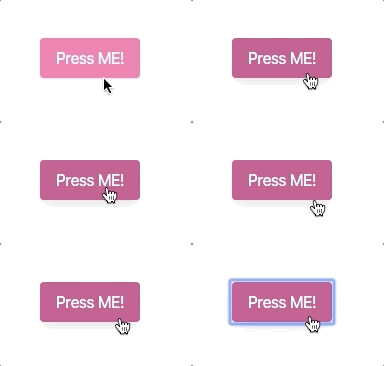
<p>Ok cool, but it’s kinda boring right? You hover over it and nothing happens. What if we made it look more interactive. Let’s do that, we’ll add a simple hover effect to increase the shadow size and darken the button.</p>

<div class="language-html highlighter-rouge"><div class="highlight"><pre class="highlight"><code><span class="nt">&lt;button</span> <span class="na">class=</span><span class="s">"shadow hover:shadow-lg bg-pink-500 hover:bg-pink-700 text-white px-4 py-2 rounded m-10"</span><span class="nt">&gt;</span>
    Press ME!
<span class="nt">&lt;/button&gt;</span>
</code></pre></div></div>

<div class="flex justify-center my-6">
  <img src="/assets/img/blog-posts/ember-and-tailwind/button-hover.gif" width="192" height="122" alt="The pink button darkening and its shadow growing on hover" />
</div>

<p>I’m going to take it you get the gist by now. By using these small independent classes we can specify good looking and complex designs  without having to worry about writing our own styles. This has a huge impact when creating mocks UIs and helps set a standard set of classes for growing or already large projects.</p>

<blockquote>
  <p>For large projects under re-write or time critical tasks you’ll find the amount of css you <em>don’t</em> need to write is a godsend! Speaking from first hand experience on this one.</p>
</blockquote>

<p>Ok now that I have you sold on how awesome tailwindcss is let’s add it to your ember project!</p>

<h2 id="adding-tailwindcss-to-an-ember-app">Adding tailwindcss to an ember app</h2>

<p>Previously we could install the library using <code class="language-plaintext highlighter-rouge">ember-cli-tailwind</code> by the great people at <a href="https://embermap.com">embermap</a> but it has been deprecated in favour of another package. While more configurable and undoubtably	better there is a little more setup involved and since I use it <em>a lot</em> I wanted to write a small guide on adding it to your projects.</p>

<p>So this post covers how we can get an ember app up and running with tailwind but if your pretty comfortable with embers basics you can check out the excellent documentation on the github page <a href="https://github.com/chrism/emberjs-tailwind-purgecss">here</a>.</p>

<h2 id="getting-started">Getting started</h2>

<blockquote>
  <p>skip this if it’s an existing app</p>
</blockquote>

<p>First of all let’s get ember installed. We’ll need a version of node installed first, details here. Then we can install ember using ‘npm’ like so:</p>

<div class="language-bash highlighter-rouge"><div class="highlight"><pre class="highlight"><code>npm <span class="nb">install </span>ember-cli <span class="nt">-g</span>
</code></pre></div></div>

<p>Now that we have ember installed we can create our new project and set it running with the following commands:</p>

<div class="language-bash highlighter-rouge"><div class="highlight"><pre class="highlight"><code>ember new tailwind-app
<span class="nb">cd </span>tailwind-app/
</code></pre></div></div>

<p>### A quick proof of concept</p>

<p>Now before we dive into setting up tailwind let’s first create a small example that uses tailwind classes, that way we know they are working later. Add the following to your <code class="language-plaintext highlighter-rouge">app/templates/application.hbs</code> file.</p>

<div class="language-hbs highlighter-rouge"><div class="highlight"><pre class="highlight"><code><span class="nt">&lt;div</span> <span class="na">class=</span><span class="s">"flex items-center justify-center h-screen bg-gray-100"</span><span class="nt">&gt;</span>
  <span class="nt">&lt;button</span> <span class="na">class=</span><span class="s">"shadow-md hover:shadow-lg hover:bg-green-500 bg-green-400 text-white px-8 py-5 rounded"</span><span class="nt">&gt;</span>
    A beautiful button!
  <span class="nt">&lt;/button&gt;</span>
<span class="nt">&lt;/div&gt;</span>
</code></pre></div></div>

<p>Now to get our ember app up and running we need to run <code class="language-plaintext highlighter-rouge">ember serve</code>. Once that’s finished building visit <code class="language-plaintext highlighter-rouge">localhost:4200</code> in your browser. You should see the following beautiful button.</p>

<div class="flex justify-center my-6">
  <img src="/assets/img/blog-posts/ember-and-tailwind/plain-button.png" width="276" height="44" alt="Unstyled text reading A beautiful button!" />
</div>

<p>….. anyway on with the tutorial!</p>

<h2 id="configuring-postcss">Configuring PostCSS</h2>
<p>The next step is to add tailwind itself and configure it into the ember build pipeline. It’s easier than it sounds I swear. To start we will need the following dependencies:</p>

<div class="language-bash highlighter-rouge"><div class="highlight"><pre class="highlight"><code>yarn add ember-cli-postcss tailwindcss autoprefixer postcss-import @fullhuman/postcss-purgecss <span class="nt">-D</span>
</code></pre></div></div>

<p>Next we need to generate the tailwind configuration file. To do this we need to enter the tailwind directory within our app and run the tailwind init command using <code class="language-plaintext highlighter-rouge">npx</code> (<code class="language-plaintext highlighter-rouge">npm install npx -g</code> if you don’t have it).</p>

<div class="language-bash highlighter-rouge"><div class="highlight"><pre class="highlight"><code><span class="nb">mkdir </span>app/tailwind
npx tailwind init app/tailwind/config.js <span class="nt">--full</span>
</code></pre></div></div>

<blockquote>
  <p>For a real project we wouldn’t want to use <code class="language-plaintext highlighter-rouge">--full</code> as it includes all of Tailwinds default configuration. You can see more info on this <a href="https://tailwindcss.com/docs/configuration/#creating-your-configuration-file">here</a></p>
</blockquote>

<blockquote>
  <p>Before going further you might want to add <code class="language-plaintext highlighter-rouge">/*global module*/</code> to the top of our new config file to suppress build warnings</p>
</blockquote>

<p>Only two more steps left to go! Now we want to configure PostCSS in the Ember Build Pipeline. To do this we need to open <code class="language-plaintext highlighter-rouge">ember-cli-build.js</code> and update it to look like the following:</p>

<div class="language-js highlighter-rouge"><div class="highlight"><pre class="highlight"><code><span class="c1">// ember-cli-build.js</span>
<span class="dl">'</span><span class="s1">use strict</span><span class="dl">'</span><span class="p">;</span>

<span class="kd">const</span> <span class="nx">EmberApp</span> <span class="o">=</span> <span class="nf">require</span><span class="p">(</span><span class="dl">'</span><span class="s1">ember-cli/lib/broccoli/ember-app</span><span class="dl">'</span><span class="p">);</span>
<span class="kd">const</span> <span class="nx">isProduction</span> <span class="o">=</span> <span class="nx">EmberApp</span><span class="p">.</span><span class="nf">env</span><span class="p">()</span> <span class="o">===</span> <span class="dl">'</span><span class="s1">production</span><span class="dl">'</span><span class="p">;</span>

<span class="kd">const</span> <span class="nx">purgeCSS</span> <span class="o">=</span> <span class="p">{</span>
  <span class="na">module</span><span class="p">:</span> <span class="nf">require</span><span class="p">(</span><span class="dl">'</span><span class="s1">@fullhuman/postcss-purgecss</span><span class="dl">'</span><span class="p">),</span>
  <span class="na">options</span><span class="p">:</span> <span class="p">{</span>
    <span class="na">content</span><span class="p">:</span> <span class="p">[</span>
      <span class="c1">// add extra paths here for components/controllers which include tailwind classes</span>
      <span class="dl">'</span><span class="s1">./app/index.html</span><span class="dl">'</span><span class="p">,</span>
      <span class="dl">'</span><span class="s1">./app/templates/**/*.hbs</span><span class="dl">'</span>
    <span class="p">],</span>
    <span class="na">defaultExtractor</span><span class="p">:</span> <span class="nx">content</span> <span class="o">=&gt;</span> <span class="nx">content</span><span class="p">.</span><span class="nf">match</span><span class="p">(</span><span class="sr">/</span><span class="se">[</span><span class="sr">A-Za-z0-9-_:</span><span class="se">/]</span><span class="sr">+/g</span><span class="p">)</span> <span class="o">||</span> <span class="p">[]</span>
  <span class="p">}</span>
<span class="p">}</span>

<span class="nx">module</span><span class="p">.</span><span class="nx">exports</span> <span class="o">=</span> <span class="kd">function</span><span class="p">(</span><span class="nx">defaults</span><span class="p">)</span> <span class="p">{</span>
  <span class="kd">let</span> <span class="nx">app</span> <span class="o">=</span> <span class="k">new</span> <span class="nc">EmberApp</span><span class="p">(</span><span class="nx">defaults</span><span class="p">,</span> <span class="p">{</span>
    <span class="na">postcssOptions</span><span class="p">:</span> <span class="p">{</span>
      <span class="na">compile</span><span class="p">:</span> <span class="p">{</span>
        <span class="na">plugins</span><span class="p">:</span> <span class="p">[</span>
          <span class="p">{</span>
            <span class="na">module</span><span class="p">:</span> <span class="nf">require</span><span class="p">(</span><span class="dl">'</span><span class="s1">postcss-import</span><span class="dl">'</span><span class="p">),</span>
            <span class="na">options</span><span class="p">:</span> <span class="p">{</span>
              <span class="na">path</span><span class="p">:</span> <span class="p">[</span><span class="dl">'</span><span class="s1">node_modules</span><span class="dl">'</span><span class="p">]</span>
            <span class="p">}</span>
          <span class="p">},</span>
          <span class="nf">require</span><span class="p">(</span><span class="dl">'</span><span class="s1">tailwindcss</span><span class="dl">'</span><span class="p">)(</span><span class="dl">'</span><span class="s1">./app/tailwind/config.js</span><span class="dl">'</span><span class="p">),</span>
          <span class="p">...</span><span class="nx">isProduction</span> <span class="p">?</span> <span class="p">[</span><span class="nx">purgeCSS</span><span class="p">]</span> <span class="p">:</span> <span class="p">[]</span>
        <span class="p">]</span>
      <span class="p">}</span>
    <span class="p">}</span>
  <span class="p">});</span>
  <span class="k">return</span> <span class="nx">app</span><span class="p">.</span><span class="nf">toTree</span><span class="p">();</span>
<span class="p">};</span>
</code></pre></div></div>

<h2 id="wiring-up-tailwind">Wiring up Tailwind</h2>
<p>The last step is to create a new css file and ensure that the tailwind css is included. We want to create <code class="language-plaintext highlighter-rouge">app/styles/components.css</code> and <code class="language-plaintext highlighter-rouge">app/styles/utilities.css</code> and include them in our existing <code class="language-plaintext highlighter-rouge">app/styles/app.css</code> file like the following.</p>

<div class="language-css highlighter-rouge"><div class="highlight"><pre class="highlight"><code><span class="k">@import</span> <span class="s1">"tailwindcss/base"</span><span class="p">;</span>

<span class="k">@import</span> <span class="s1">"tailwindcss/components"</span><span class="p">;</span>
<span class="k">@import</span> <span class="s1">"components.css"</span><span class="p">;</span>

<span class="k">@import</span> <span class="s1">"tailwindcss/utilities"</span><span class="p">;</span>
<span class="k">@import</span> <span class="s1">"utilities.css"</span><span class="p">;</span>
</code></pre></div></div>

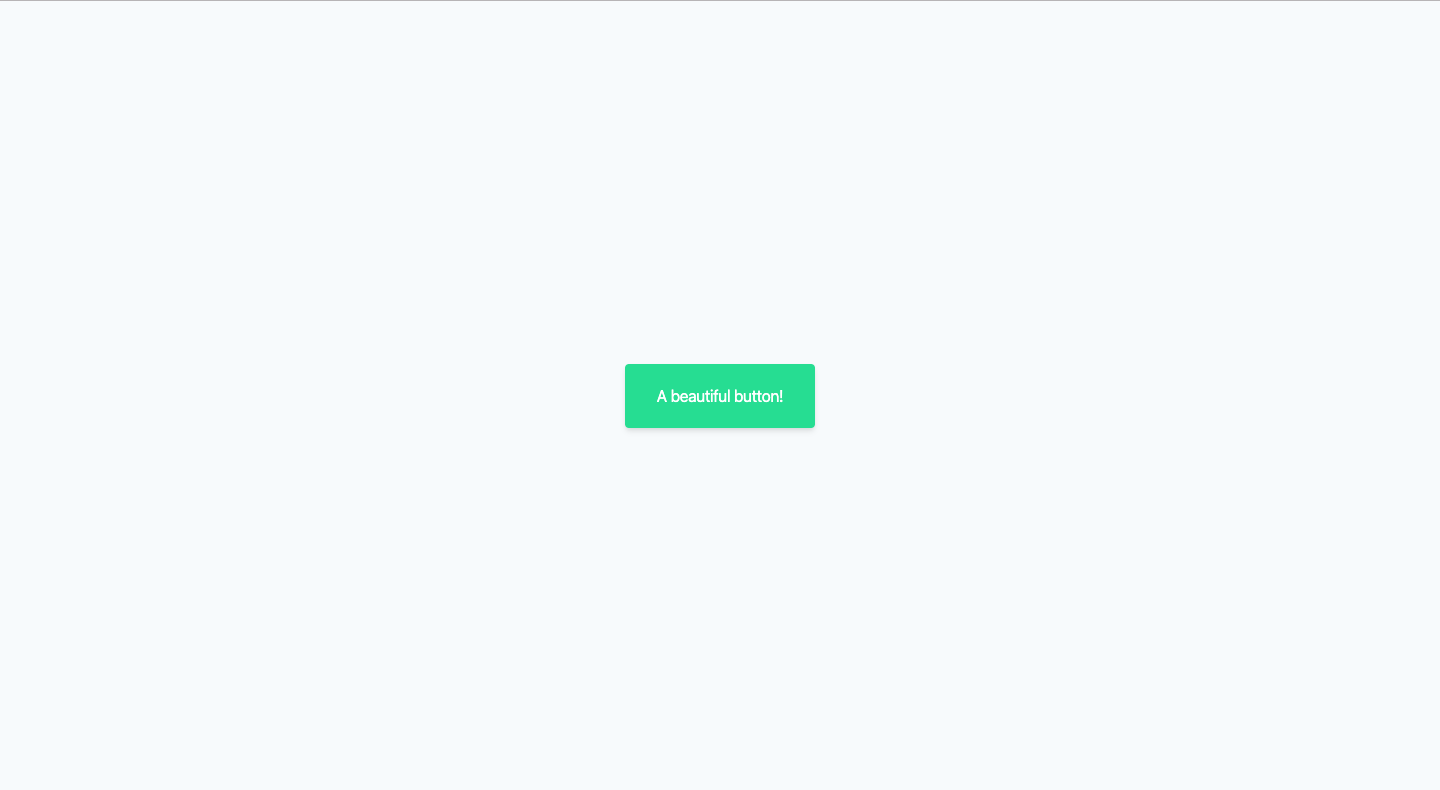
<p>Awesome! Now we can restart our app (running <code class="language-plaintext highlighter-rouge">ember serve</code>) and we should have a styled application! Our template should look like the below image.</p>

<div class="flex justify-center my-6">
  <img src="/assets/img/blog-posts/ember-and-tailwind/finished-button.png" width="1440" height="790" alt="A green rounded button reading A beautiful button! on a pale background" />
</div>

<p>That’s a bit better 😄.</p>]]></content><author><name>James Byrne</name></author><summary type="html"><![CDATA[How to add Tailwind CSS to an Ember app: what utility-first CSS means, a worked button example, and the PostCSS setup that wires it in.]]></summary><media:thumbnail xmlns:media="http://search.yahoo.com/mrss/" url="https://byrnecodes.com/assets/img/social/ember-and-tailwind.png" /><media:content medium="image" url="https://byrnecodes.com/assets/img/social/ember-and-tailwind.png" xmlns:media="http://search.yahoo.com/mrss/" /></entry><entry><title type="html">Static Types in EmberJs?</title><link href="https://byrnecodes.com/2019/06/05/types-in-ember" rel="alternate" type="text/html" title="Static Types in EmberJs?" /><published>2019-06-05T00:00:00+00:00</published><updated>2019-06-05T00:00:00+00:00</updated><id>https://byrnecodes.com/2019/06/05/types-in-ember</id><content type="html" xml:base="https://byrnecodes.com/2019/06/05/types-in-ember"><![CDATA[<p>So you’ve decided to add Typescript to your Ember project. You’ve heard all about the benefits of Static Typing and how it will deliver a more maintainable codebase than plain ol’ javascript (couldn’t be that hard right?).</p>

<p>Well before you dive in head first there are a few points I’d recommend you consider. After all, this is a change to your underlying programming language (yes I know it’s a superset and more on that later) so some pros and cons are to be expected. But to start of positive, let’s look at some of the upsides first.</p>

<blockquote>
  <p>Note I will not be discussing Classes or decorators much in this doc, if you want an intro to them I highly recommend <a href="https://web.archive.org/web/20220331122851/https://www.pzuraq.com/coming-soon-in-ember-octane-part-1-native-classes/">this post</a> by <a href="https://www.pzuraq.com">pzuraq</a>.</p>
</blockquote>

<h2 id="the-good">The Good</h2>
<h3 id="the-benefits-of-static-typing">The Benefits of Static Typing</h3>

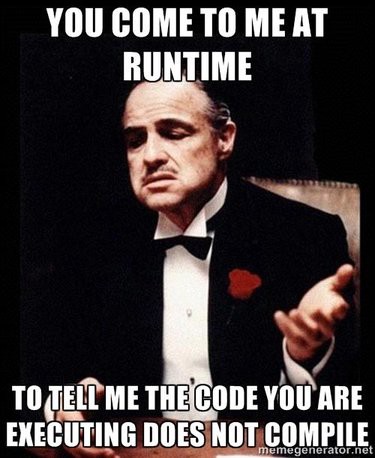
<div class="flex justify-center my-6">
  <img src="/assets/img/blog-posts/types-in-ember/meme.jpg" width="375" height="458" alt="Godfather meme: you come to me at runtime to tell me the code you are executing does not compile" />
</div>

<blockquote>
  <p>This is now my favourite meme ever</p>
</blockquote>

<p>Probably the most talked about feature of Typescript is its Static Types which we can use to specify the type of value we expect from a paramter/variable. This in turn gives the Typescript compiler the ability to catch common errors in the compile step, reducing the number of bugs that make it to production.</p>

<p>An example of this would be parsing some data structure. Let’s say we are parsing an error but that the error can take a number of shapes. It can be a string or an object containing a list of strings. A potential solution might look something like this:</p>

<div class="language-js highlighter-rouge"><div class="highlight"><pre class="highlight"><code><span class="kd">function</span> <span class="nf">getAllErrors</span><span class="p">(</span><span class="nx">error</span> <span class="o">=</span> <span class="p">{})</span> <span class="p">{</span>
  <span class="k">if </span><span class="p">(</span><span class="k">typeof</span> <span class="nx">error</span> <span class="o">===</span> <span class="dl">'</span><span class="s1">string</span><span class="dl">'</span><span class="p">)</span> <span class="k">return</span> <span class="p">[</span><span class="nx">error</span><span class="p">];</span>
  <span class="k">if </span><span class="p">(</span><span class="k">typeof</span> <span class="nx">error</span> <span class="o">===</span> <span class="dl">'</span><span class="s1">object</span><span class="dl">'</span><span class="p">)</span> <span class="k">return</span> <span class="nx">error</span><span class="p">.</span><span class="nx">errors</span><span class="p">;</span>

  <span class="k">return</span> <span class="p">[];</span>
<span class="p">}</span>
</code></pre></div></div>

<p>This looks good at first glance, we take in an error, check it’s types and if it matches what we want we return it, otherwise we return an empty list. However there is an bug here, if <code class="language-plaintext highlighter-rouge">error</code> is passed as <code class="language-plaintext highlighter-rouge">null</code> it will fail the first <code class="language-plaintext highlighter-rouge">if</code> statement but pass the later.</p>

<blockquote>
  <p>because of course <code class="language-plaintext highlighter-rouge">typeof null === 'object'</code> ….</p>
</blockquote>

<p>Obviously that is not what we want. Luckily Static Typing will catch this error. Let’s start by writing the types (something you should always do first).</p>

<div class="language-ts highlighter-rouge"><div class="highlight"><pre class="highlight"><code><span class="kd">type</span> <span class="nx">ErrorMessage</span> <span class="o">=</span> <span class="kr">string</span><span class="p">;</span>

<span class="kr">interface</span> <span class="nb">Error</span> <span class="p">{</span>
  <span class="nl">errors</span><span class="p">:</span> <span class="nb">Array</span><span class="o">&lt;</span><span class="nx">ErrorMessage</span><span class="o">&gt;</span>
<span class="p">}</span>

<span class="kd">type</span> <span class="nx">PotentialError</span> <span class="o">=</span> <span class="kr">any</span> <span class="o">|</span> <span class="nx">ErrorMessage</span> <span class="o">|</span> <span class="nb">Error</span><span class="p">;</span>
</code></pre></div></div>

<p>Ok now we have a good idea what the shape of our data structures will be and we can express the intent of our function more clearly.</p>

<div class="language-ts highlighter-rouge"><div class="highlight"><pre class="highlight"><code><span class="kd">function</span> <span class="nf">getAllErrors</span><span class="p">(</span><span class="nx">error</span><span class="p">:</span> <span class="nx">PotentialError</span><span class="p">):</span> <span class="nb">Array</span><span class="o">&lt;</span><span class="nx">ErrorMessage</span><span class="o">&gt;</span> <span class="p">{</span>
  <span class="k">if </span><span class="p">(</span><span class="nf">isErrorMessage</span><span class="p">(</span><span class="nx">error</span><span class="p">))</span> <span class="k">return</span> <span class="p">[</span><span class="nx">error</span><span class="p">];</span>
  <span class="k">if </span><span class="p">(</span><span class="nf">isError</span><span class="p">(</span><span class="nx">error</span><span class="p">))</span> <span class="k">return</span> <span class="nx">error</span><span class="p">.</span><span class="nx">errors</span><span class="p">;</span>

  <span class="k">return</span> <span class="p">[];</span>
<span class="p">}</span>
</code></pre></div></div>

<p>Much nicer! But wait! What are those new functions? <code class="language-plaintext highlighter-rouge">isErrorMessage</code> and <code class="language-plaintext highlighter-rouge">isError</code>? Well those are type guards. They allow you to tell the typescript compiler what type is being returned. So for instance the <code class="language-plaintext highlighter-rouge">isError</code> type guard could look like this:</p>

<div class="language-ts highlighter-rouge"><div class="highlight"><pre class="highlight"><code><span class="kd">function</span> <span class="nf">isError</span><span class="p">(</span><span class="nx">error</span><span class="p">:</span> <span class="nx">PotentialError</span><span class="p">):</span> <span class="nx">error</span> <span class="k">is</span> <span class="nb">Error</span> <span class="p">{</span>
  <span class="k">return</span> <span class="dl">'</span><span class="s1">errors</span><span class="dl">'</span> <span class="k">in</span> <span class="nx">error</span><span class="p">;</span>
<span class="p">}</span>
</code></pre></div></div>

<p>And now that the compiler knows the type of the error, if we tried to change the return statement to return a parameter not in the <code class="language-plaintext highlighter-rouge">Error</code> interface or return the first index of <code class="language-plaintext highlighter-rouge">errors.errors</code> like below our compiler will tell us.</p>

<div class="language-ts highlighter-rouge"><div class="highlight"><pre class="highlight"><code><span class="k">if </span><span class="p">(</span><span class="nf">isError</span><span class="p">(</span><span class="nx">error</span><span class="p">))</span> <span class="k">return</span> <span class="nx">error</span><span class="p">.</span><span class="nx">errors</span><span class="p">[</span><span class="mi">0</span><span class="p">];</span>
<span class="c1">//                               ^</span>
<span class="c1">//                               |</span>
<span class="c1">// Type string is not assignable to type string[]</span>
</code></pre></div></div>

<p>This is a big win for maintainability because we know exactly what to expect from functions we have written and more importantly ones we didn’t.</p>

<h3 id="documentation">Documentation</h3>
<p>Notice as well how clear the implementation of our example function is now. Previously, since this is a utility function meant for usage throughout the application, I would have written a set of comments like the following:</p>

<div class="language-js highlighter-rouge"><div class="highlight"><pre class="highlight"><code><span class="cm">/* @method getAllErrors/1
 * @return List(Object)
 *
 * If it is a simple error (a
 * string) then that will be returned as
 * the expected return type.
 *
 * If a list of errors are found within
 * the object they will be returned.
 *
 * If it is not a string or an object we
 * will return an empty list.
 */</span>
<span class="kd">function</span> <span class="nf">getAllErrors</span><span class="p">(</span><span class="nx">error</span> <span class="o">=</span> <span class="p">{})</span> <span class="p">{</span>
  <span class="k">if </span><span class="p">(</span><span class="k">typeof</span> <span class="nx">error</span> <span class="o">===</span> <span class="dl">'</span><span class="s1">string</span><span class="dl">'</span><span class="p">)</span> <span class="k">return</span> <span class="p">[</span><span class="nx">error</span><span class="p">];</span>
  <span class="k">if </span><span class="p">(</span><span class="k">typeof</span> <span class="nx">error</span> <span class="o">===</span> <span class="dl">'</span><span class="s1">object</span><span class="dl">'</span><span class="p">)</span> <span class="k">return</span> <span class="nx">error</span><span class="p">.</span><span class="nx">errors</span><span class="p">;</span>

  <span class="k">return</span> <span class="p">[];</span>
<span class="p">}</span>
</code></pre></div></div>

<p>As the application becomes more complex I would consider this type of information to be the bare minimum required (more on that in a minute). Knowing the return types and the types of parameter a function accepts will let us both avoid issues when using the function and create a clear boundary within which we can refactor the function itself.</p>

<p>Now if we consider the same Typescript code, it’s obvious these comments are no longer required.</p>

<div class="language-ts highlighter-rouge"><div class="highlight"><pre class="highlight"><code><span class="kd">function</span> <span class="nf">getAllErrors</span><span class="p">(</span><span class="nx">error</span><span class="p">:</span> <span class="nx">PotentialError</span><span class="p">):</span> <span class="nb">Array</span><span class="o">&lt;</span><span class="nx">ErrorMessage</span><span class="o">&gt;</span> <span class="p">{</span>
</code></pre></div></div>

<p>More than that these types will <em>have</em> to stay up to date as we refactor (a big problem with regular comments) and they will give us extra information through compiler warnings and editor tools. I did say this was the bar minimum information required though so I will touch on that briefly.</p>

<p>Typescript gives us the types to answer the <em>what</em> of a function but not the <em>why</em>. For very simple functions just the name of the function is enough but sometimes a function will be quite complex, have a limited scope or have side effects. These things should still be recorded within the functions documentation. Otherwise we can’t know when to use a function or more importantly <em>when not too</em>.</p>

<p>In the case where documentation is still required (the <em>why</em> of a function is complex) the Typescript eco-system provides <a href="https://github.com/Microsoft/tsdoc">TsDoc</a>. This is a standard way of writing documentation that also works with tooling such as the vscode editor.</p>

<h3 id="tooling">Tooling</h3>
<p>Another benefit of Typescript is its excellent editor integration, especially with <a href="https://code.visualstudio.com/docs/languages/typescript">VsCode</a> where it offers intellisense, tools for refactoring, debugging, linting, documentation and formatting. All of these things will be surfaced by your editor and the compiler.</p>

<blockquote>
  <p>For Vim users check out <a href="https://github.com/Quramy/tsuquyomi">tsuquyomi</a> to get a similar set of tools</p>
</blockquote>

<h3 id="a-superset">A Superset</h3>
<p>Maybe Typescripts biggest feature and without question one of the biggest reasons for its growth. It’s a superset of javascript, which means that any javascript is also valid typescript. This makes becoming a typescript developer as easy as re-naming your <code class="language-plaintext highlighter-rouge">.js</code> files to <code class="language-plaintext highlighter-rouge">.ts</code>.</p>

<p>From there you can gradually type more and more of the code and make the compiler stricter until your whole codebase (or whatever amount you want) is fully written with Typescript in mind. This is huge for existing projects that don’t want to start all over again but still want the benefits of a typed language.</p>

<blockquote>
  <p>Note you will need to configure some sort of build pipeline but I’m considering that as separate</p>
</blockquote>

<h2 id="the-bad">The Bad</h2>
<h3 id="breaking-changes">Breaking Changes</h3>
<p>Unfortunately Typescript does not strictly follow <a href="https://github.com/Microsoft/TypeScript/issues/14116">semver</a>, something we take for granted within the Ember eco-system. Due to marketing pressure breaking changes are introduced through minor versions, though they do maintain some semblance of semver after that. A helpful diagram/comment from <a href="https://github.com/Microsoft/TypeScript/issues/14116#issuecomment-280915422">niieani</a>  shows how we should approach this.</p>

<div class="language-plaintext highlighter-rouge"><div class="highlight"><pre class="highlight"><code>       marketing
           ∨
TypeScript 2.34.2.1
             ∧∧ ∧ ∧
          major ∧ patch
                ∧
              minor
</code></pre></div></div>

<p>This is a problem in an eco-system that expects things to follow server and not make breaking changes on minor releases. But it surfaces a bigger problem. Besides Ember itself (though this applies to all frameworks), Typescript has the potential to require the largest refactors of your codebase.</p>

<p>Although unlikely, any fundamental changes to Typescript will have a knock on effect to your codebase and potentially a large swath of it. This makes the lack of semver even more concerning and is something that must be considered carefully before diving straight in.</p>

<h3 id="conventions--expertise">Conventions &amp; Expertise</h3>
<p>Another consideration which I think is often glossed over is conventions and the expertise of your team. Sure Typescript is a super set of javascript but that doesn’t mean your team is positioned to take advantage of that. For instance, a question that arises from our previous example.</p>

<blockquote>
  <p>Should the types we declared above exist within a global types file?</p>
</blockquote>

<p>How would you answer this question? I can definitely see the <code class="language-plaintext highlighter-rouge">PotentialError</code> type being used elsewhere in the application and Typescript offers us a way of declaring a global type within a project.</p>

<p>It sounds reasonable and useful, however my answer would be:</p>

<blockquote>
  <p>No. They are too specific, any global <code class="language-plaintext highlighter-rouge">Error</code> type would have to be far more generic. These types are specific to the structures expected by the functions within the file. At best they could be some sub-type of a broader type within the global types namespace.</p>
</blockquote>

<p>I am lucky to have worked with a variety of different languages and frameworks from early in my career that includes both typed and non-typed languages. But not all teams have that kind of experience and coming from a Javascript background it will be important to make sure your team has the expertise they need to make the right decisions. Otherwise you can create one hell of a mess.</p>

<h3 id="missing-typings">Missing Typings</h3>
<p>Unfortunately not every library comes with a set of types fresh out of the oven. As a result you may run into issues where common libraries don’t have types. “Sure no problem, it’s a superset, it will still work” I hear you say.</p>

<p>While true the Typescript compiler &amp; tools are able to strut their stuff best when the configuration is stricter. This will lead to errors &amp; warnings when attempting to compile code that does not have types or at the least no type safety, which kind of defeats the point.</p>

<p>Now there are great projects such as <a href="https://definitelytyped.org/">DefinitelyTyped</a> which provides a huge library of type definitions but even then common libraries such as <a href="http://ember-concurrency.com/docs/introduction/">ember-concurrency</a> and <a href="https://embermap.github.io/ember-data-storefront/">Ember Data Storefront</a> do not have types. This means either adding your own types though a <code class="language-plaintext highlighter-rouge">.d.ts</code> (a type definitions file) or compromising on the type safety you are supposed to rely on.</p>

<h2 id="transitioning-to-typescript">Transitioning To Typescript</h2>
<p>So you’ve got this far and you’re undeterred, well then let’s outline a simple method of transitioning your existing Ember application to use Typescript.</p>

<p>Firstly we will install the excellent project <a href="https://github.com/typed-ember/ember-cli-typescript"><code class="language-plaintext highlighter-rouge">ember-cli-typescript</code></a>  which will take care of building &amp; converting our typescript files for us. This is the simplest way of setting up Typescript but it does have <a href="https://typed-ember.github.io/ember-cli-typescript/docs/ts-guide/current-limitations">limitations</a> that we should be aware of.</p>

<p>As for typing the application itself <a href="https://github.com/mike-north">Mike North</a>  recommends the following steps:</p>

<ol>
  <li>Start with allowing implicit <code class="language-plaintext highlighter-rouge">anys</code> and just rename all <code class="language-plaintext highlighter-rouge">.js</code> files to <code class="language-plaintext highlighter-rouge">.ts</code></li>
  <li>Add as much type info as possible without going into detail. Opt for explicit <code class="language-plaintext highlighter-rouge">any</code>. Ban implicit <code class="language-plaintext highlighter-rouge">any</code></li>
  <li>Go into detail at certain, commonly used, modules (services, models etc)</li>
</ol>

<p>By following these steps we can convert our whole application to typescript without interfering with other members of the team or preventing feature work.</p>

<p>And there you have it, Typescript in Ember with minimum fuss!</p>]]></content><author><name>James Byrne</name></author><summary type="html"><![CDATA[Thinking of adding TypeScript to an Ember app? The real benefits of static typing, the costs that come with them, and how to make the move.]]></summary><media:thumbnail xmlns:media="http://search.yahoo.com/mrss/" url="https://byrnecodes.com/assets/img/social/types-in-ember.png" /><media:content medium="image" url="https://byrnecodes.com/assets/img/social/types-in-ember.png" xmlns:media="http://search.yahoo.com/mrss/" /></entry><entry><title type="html">A Retrospective on Ember</title><link href="https://byrnecodes.com/2018/07/18/ember-a-retrospective" rel="alternate" type="text/html" title="A Retrospective on Ember" /><published>2018-07-18T00:00:00+00:00</published><updated>2018-07-18T00:00:00+00:00</updated><id>https://byrnecodes.com/2018/07/18/ember-a-retrospective</id><content type="html" xml:base="https://byrnecodes.com/2018/07/18/ember-a-retrospective"><![CDATA[<p>I’ve been programming professionally for a while now, with some Elixir, Erlang and Ruby with a brief stint of contracting with Angular 4 thrown in. Ergo I thought with my new found knowledge why not write some of it down so people on the internet could tell me I’m wrong! ……. wait.</p>

<h2 id="what-i-like-about-ember">What I like about ember</h2>

<h3 id="out-of-the-box">Out of the box</h3>

<p>Embers <strong>convention over configuration</strong> setup (the cool kids call this Zero-Config now) allows you to get up and running with your new project in the time it takes to run yarn/npm install. Which is anytime between now and the heat death of the universe, but you get my point.</p>

<p>This is really great for experimenting since you don’t need to spend any time on setup, just get working. With bigger projects you get the same benefit <em>but</em>, with the confidence that your project will scale over time.</p>

<h3 id="solid-development-experience">Solid Development Experience</h3>

<p>One of the things I love about Ember is the development experience. Over the last two years I have learned <strong>alot!</strong> Part of this has been how to best utilise the languages, patterns and frameworks at my disposal.</p>

<p>With Ember I’ve learned how to use the conventions and where I can lean on the framework to do the heavy lifting for me. This means I spend less time bike shedding and more time being productive. But the best part is that I am still seeing these results two years on. Partly due to the ecosystems growth in that time and partly due to a better mastery of existing tools.</p>

<p>The much loved <a href="https://github.com/machty/ember-concurrency">ember-concurrency</a> addon is a great example of this. Being new I wrote a lot of mixed synchronous/asynchronous state management code that turned out to be hard to manage and inflexible (sue me :P). Over the last year when working on smaller apps I have learned how to massively simplify managing state across an ember application using ember-concurrency tasks (generator functions).</p>

<p>As a result this new code is easier to test, maintain, change and most importantly, it’s simple. Something which is often overlooked in application design and programming but which is vitally important.</p>

<h3 id="community">Community</h3>

<p>The Ember community is awesome, simple as that. Both the core team and the community at large are extremely friendly and there is a real spirit around the project. It’s not driven by one of the big corporations or by a single person but rather the collective passion of the commun-. Ohh that was close, if I said the “comm” word three times Jono Bacon might appear.</p>

<h3 id="the-pwa-story">The PWA Story</h3>

<p>Now this is easily the thing I am most excited about. Ember has a number of really cool addons such as <a href="https://github.com/DockYard/ember-service-worker">ember-service-worker</a>, <a href="https://github.com/sir-dunxalot/ember-cli-concat">ember-cli-concat</a> and <a href="https://github.com/ivanvanderbyl/ember-cli-critical">ember-cli-critical</a> that make creating Progressive Web Apps  much much easier. Dockyard has made a <a href="https://dockyard.com/blog/2017/07/20/how-to-build-a-pwa-with-ember">great post</a> showing just how easy it is to upgrade a standard app into a PWA.</p>

<p>And it doesn’t stop there, both <a href="https://github.com/pouchdb-community/ember-pouch">ember-pouch</a> and <a href="https://github.com/orbitjs/ember-orbit">ember-orbit</a> create a compelling story for apps that need to allow collaboration and creation while still offline and sync changes once a connection is re-established. A keen interest for me.</p>

<p>This is something I am really excited about and I can’t wait to see what the state of Progressive Web Apps will look like in the future. <em>shakes fist at safari &amp; iOS</em></p>

<h2 id="things-i-dont-like">Things I don’t like</h2>

<p>So here’s the rub, there are not many things I dislike about Ember itself. I am a big believer of the <em>right tool for the job</em> mentality. As a result I don’t have many complaints, because the problem isn’t an issue with Ember it’s just not the right tool for the job I want to complete. For instance, if I wasn’t building a Single Page App, I wouldn’t choose Ember. Is that a bad thing? No, it’s just not the right tool. And saying that a framework should be able to do everything is like saying a language should be able to do the same. It’s a fools errand.</p>

<p>As a result I find the things I am not impressed with are not issues with Ember per se, but rather things I wish Javascript had. For instance I am really looking forward to having better Typescript support in Ember. My brief foray back into the Angular world (note to self: don’t mention the war) allowed me to experiment with Typescript in a real world project and I found it very useful in practice.</p>

<p>I would also love for functional programming to become more widely used within the Ember ecosystem, but unfortunately the trend seems to be going in the other direction. Which again, is not a bad thing, just the way the tool works.</p>

<h3 id="closing-comments">Closing comments</h3>

<p>Overall I have really enjoyed my time with Ember. Compared to the other frameworks, libraries and languages I have tried, Ember has struck a cord with me in both the values it maintains and the practical benefits it boasts. Looking forward I am excited to see what comes next for Ember and how it will help me deliver value for my users.</p>

<p><em>P.S. Also have you seen the mascots?</em><a href="https://www.emberjs.com/mascots/"><em>They are awesome!</em></a></p>]]></content><author><name>James Byrne</name></author><summary type="html"><![CDATA[What I like about Ember after years of building with it, from its conventions and tooling to its community and PWA story, and what I’d change.]]></summary><media:thumbnail xmlns:media="http://search.yahoo.com/mrss/" url="https://byrnecodes.com/assets/img/social/ember-a-retrospective.png" /><media:content medium="image" url="https://byrnecodes.com/assets/img/social/ember-a-retrospective.png" xmlns:media="http://search.yahoo.com/mrss/" /></entry></feed>